What is Health Auth and how it works
Learn how Kinsula’s consent-based Health Auth layer lets you share recovery data with a verified hospital or clinic only when you choose—and revoke access anytime.
By Isaac Williams
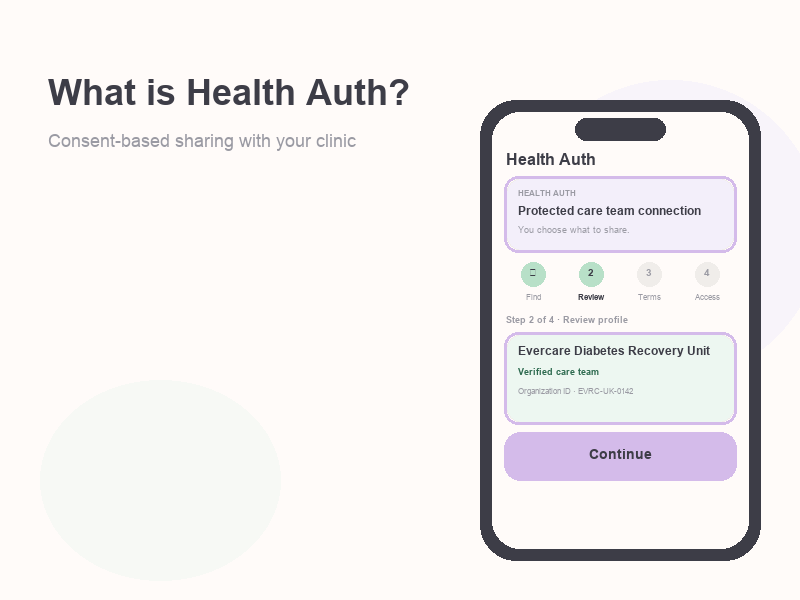
Health Auth is Kinsula’s consent-based sharing layer between your patient app and a participating hospital or clinic. Your glucose logs, medications, notes, and program progress stay in your account until you explicitly authorize a care team to access the categories you select. Nothing is shared with a clinical organization without your approval.
This guide explains what Health Auth is for, how the in-app wizard works at a high level, what data scopes mean, and what clinicians see after you authorize. For step-by-step linking instructions, see Connect your care team with Health Auth.
What is Health Auth?
Health Auth is not a separate login and it is not automatic cloud backup. It is a protected care team connection: you search for a verified organization, review its profile, accept its terms, then choose which data scopes to grant. Only scopes you turn on are stored on the active integration record your care team reads through Kinsula’s clinical tools (often alongside Evercare in pilot deployments).
You can use Kinsula fully without Health Auth if you are recovering independently. Health Auth is for patients whose hospital enrolled in a Kinsula pilot or who want structured summaries in the clinical record instead of screenshots.
Why hospitals use it
Hospital diabetes and recovery programs need timely, structured data between visits. Health Auth helps care teams:
- See glucose, medications, and program progress in one place when you consent—not ad hoc exports.
- Open secure messaging with you when the secure messaging scope is authorized.
- Rely on audit-friendly consent: authorization is tied to terms version, scopes, and timestamps.
Kinsula does not sell your data. Sharing is limited to the organization you select and only for the scopes you approve.
The four steps in the app
The Health Auth wizard in Profile → Integrations → Connect a care team (route: Integrations → Health Auth) walks through four steps. Each step shows a short security note in the app.
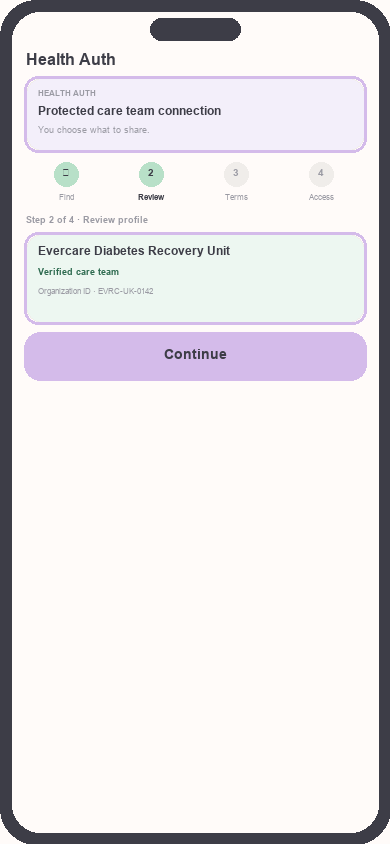
Health Auth wizard progress
Focus: Four steps from search through consent
1. Find care team (search)
Browse featured care teams or search by name or organization ID. Only verified hospitals and clinics appear in search, so you are less likely to connect to the wrong site. Select the organization that matches what your nurse or coordinator gave you.
2. Review profile (review)
Confirm name, description, contact details, and Organization ID before continuing. The app loads the latest organization profile from the server so you can verify you are connecting to the right care team.
3. Accept terms (terms)
Read the organization’s terms and data scope text. The screen lists data this care team may request (the scope labels your hospital configured). Tap I accept the terms before you continue. Accepting terms starts a time-limited Health Auth session on the server (typically about 30 minutes) for the final consent step.
4. Choose access (consent)
On Final authorization, toggle scope chips for each category the care team requested. Personal information (name and email) is selected by default when offered; you must select at least one scope to tap Authorize securely. You can Deny access to exit without sharing.
After success, Integrations shows an active connection with the authorization date. You can Disconnect (revoke) from the same screen.
What you can share (data scopes)
Scopes are fixed categories in Kinsula. Your hospital’s terms screen shows the labels; the consent step lets you turn each requested scope on or off. Typical scope keys and meanings:
| Scope | What it covers |
|---|---|
| Personal information | Name and email address on your account |
| Vitals | Glucose readings and vital signs |
| Medications | Medication and insulin logs |
| Daily notes | Daily notes and symptom tags |
| Meal logs | Meal logs and eating patterns |
| Program progress | 14-day program progress on Recovery Island |
| Secure messaging | Secure messaging with your care team |
The care team only receives data for scopes you authorized. If you did not grant meal logs, those entries are not shared through the integration. Exact chips shown depend on what the organization requests in your pilot.
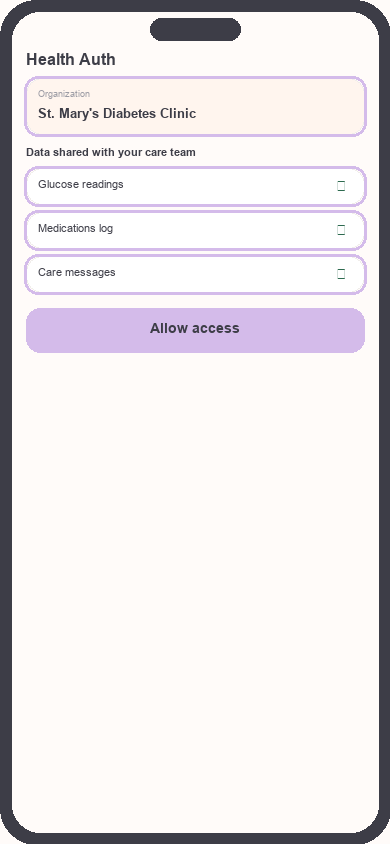
Consent step with scope chips
Focus: Choose scopes before Authorize securely
Security and privacy notes
- Encryption in transit: The app describes Health Auth as encrypted in transit; you choose what to share and can revoke access anytime.
- Explicit consent: Authorization requires accepting the current terms version. If terms change on the server, you may need to review the latest version before authorizing again.
- Sessions: Pending authorization sessions expire if you wait too long; start again from Integrations if needed.
- Deny and revoke: Denying a pending session leaves data local. Disconnect on an active integration stops new sharing going forward; copies already in the hospital record may remain per their policy.
- Audit: Successful authorize, deny, and revoke actions are logged for compliance on the server side.
How clinicians see your data after authorization
When you authorize, Kinsula creates or updates a data sharing integration for your patient record and organization. Clinicians with access in that organization can view patient data only within the scopes you granted—for example vitals and medications in the admin/clinical workspace, Care Review / cycle summaries when program progress is included, and chat threads when secure messaging is included. Authorization also links your patient to the care organization’s assignment list so your team knows consent is granted.
They do not get your full phone backup or scopes you left off. Revoking disconnects the integration for future syncs; your local Kinsula logs remain yours.
Revoking access
- Open Profile → Integrations (or the Integrations hub from the app menu).
- Find the connected organization under Care team connections.
- Tap Disconnect on an active integration.
Previously exported summaries in the hospital EHR or pilot tools may still exist under hospital retention rules; revoking stops ongoing shared access through Kinsula.
Frequently asked questions
Do I need Health Auth to use Kinsula?
No. Logging glucose, meds, and Recovery Island works without linking a hospital.
Can I connect more than one organization?
The integrations list supports multiple connections over time; each authorization is separate with its own scopes.
What if I do not see my hospital in search?
Confirm with your care team that the pilot is active and the organization is verified and published for search.
What happens if I tap Deny access on the consent screen?
The pending session is marked denied on the server and you return without creating an active integration.
Is Health Auth the same as Evercare?
Evercare is often the hospital-side system in pilot deployments. Health Auth is Kinsula’s patient-facing consent flow that gates what flows to your enrolled care team.
Related guides
Need more help?
Email support@suncture.io or return to the guides index.
Related guides
More step-by-step help for the Kinsula patient app.
Complete daily notes and quick routines
Use daily notes and Quick Log routines (Morning, before meal, after meal, Night) to capture glucose, meds, insulin, and reflections in fewer taps.
Connect your care team with Health Auth
Use Health Auth to share structured Care Review data with your hospital care team only when you explicitly consent — common in Evercare-linked pilots.
Create your Kinsula account
Sign up for a secure Kinsula cloud account so your glucose logs, medications, and Recovery Island progress sync across devices.
Log meals and track how food affects glucose
Record meals and snacks with timing so you can compare pre- and post-meal glucose and learn patterns during Recovery Island.
Log medications and build adherence
Add discharge medications, log doses with Quick Log routines, and review adherence so you and your care team see a clear med history.