Log meals and track how food affects glucose
Record meals and snacks with timing so you can compare pre- and post-meal glucose and learn patterns during Recovery Island.
By Isaac Williams
Meal logging in Kinsula is not calorie counting for its own sake — it links what you ate and when to glucose readings so you and your educator can discuss real patterns.
Steps
- Go to the Log tab and choose Meal (or include a meal inside a Before meal / 2 hr after meal quick routine).
- Enter a short description: meal type (breakfast, lunch, dinner, snack) and main components (for example “oatmeal, berries” or “grilled chicken, rice”).
- Set the time eaten if it differs from now — accuracy helps when comparing to post-meal glucose.
- Optionally note portion size or carbs if your care team asked you to track them.
- Save the meal. It appears on your daily timeline near glucose and medication entries.
- Log before meal glucose when using Quick Log Before meal, then log 2 hr after meal glucose with Quick Log 2 hr after meal on the same day when possible.
- Open Care Review or day detail views to compare meal times with glucose trends.
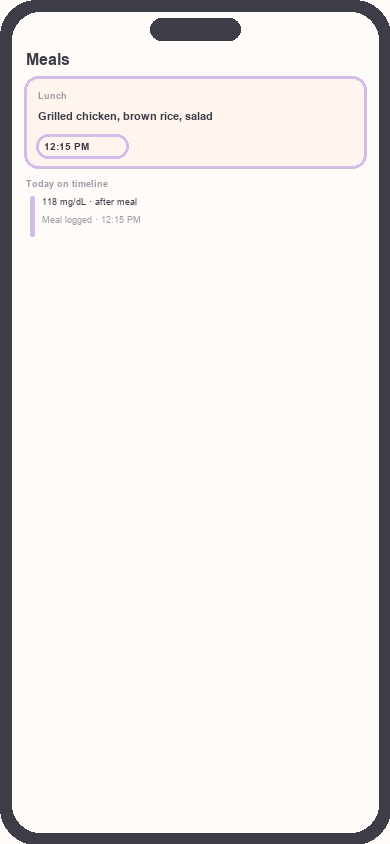
Meal log entry with timeline
Focus: Highlight meal description and timestamp
- Use Recovery Island education days that mention nutrition to reflect on logged patterns — quizzes are educational only, not personalized medical advice.
Pattern ideas to discuss with your team
- Repeated post-meal highs after the same meal type.
- Hypoglycemia symptoms after skipping carbs with insulin on board.
- Late-night snacks and fasting glucose the next morning.
Always confirm dietary changes with your dietitian or physician before making major adjustments.
Need more help?
Email support@suncture.io or return to the guides index.
Related guides
More step-by-step help for the Kinsula patient app.
Complete daily notes and quick routines
Use daily notes and Quick Log routines (Morning, before meal, after meal, Night) to capture glucose, meds, insulin, and reflections in fewer taps.
Connect your care team with Health Auth
Use Health Auth to share structured Care Review data with your hospital care team only when you explicitly consent — common in Evercare-linked pilots.
Create your Kinsula account
Sign up for a secure Kinsula cloud account so your glucose logs, medications, and Recovery Island progress sync across devices.
Log medications and build adherence
Add discharge medications, log doses with Quick Log routines, and review adherence so you and your care team see a clear med history.
Log your first glucose reading
Record a blood glucose value with context (fasting, before meal, after meal) using Quick Log or a single reading entry on the Log tab.