Log your first glucose reading
Record a blood glucose value with context (fasting, before meal, after meal) using Quick Log or a single reading entry on the Log tab.
By Isaac Williams
Logging glucose regularly helps you and your care team spot patterns during the first 14 days after discharge. Kinsula keeps each reading timestamped and tied to your care profile ranges.
Steps
- Open the Log tab in the patient app.
- Choose Quick Log for a routine (for example Morning for fasting glucose plus AM meds) or tap Glucose for a one-off reading.
- Enter your meter value in mg/dL. Double-check the number before saving.
- Select context — fasting, before meal, 2 hours after meal, bedtime, or other — so Care Review can group readings correctly.
- Add an optional note (for example “felt fine” or “after walk”) if something unusual happened.
- Tap Save. The reading appears at the top of your glucose list with a range label from your care profile.
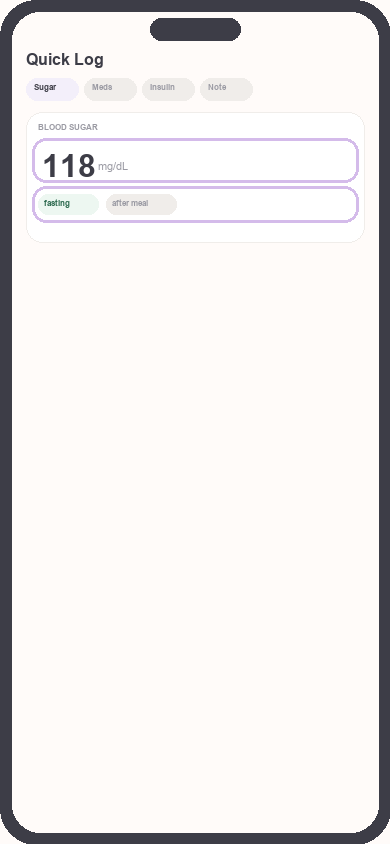
Log tab glucose entry
Focus: Highlight value field and context picker
- Pull to refresh or wait a moment if you are on a slow connection — logs sync to your Kinsula cloud account when online.
Quick routines vs single logs
| Approach | Best for |
|---|---|
| Quick Log Morning | Fasting glucose + morning medications in one save |
| Quick Log Before meal | Pre-meal glucose before you eat |
| Quick Log 2 hr after meal | Post-meal glucose check |
| Single glucose entry | One-off checks outside routines |
See Complete daily notes and quick routines for the full routine list.
Troubleshooting
- Wrong value saved: Open the reading from the list if your app version supports edit, or add a corrective note and log the correct value as a new entry.
- Range looks wrong: Update care profile targets to match your clinician’s orders.
Need more help?
Email support@suncture.io or return to the guides index.
Related guides
More step-by-step help for the Kinsula patient app.
Complete daily notes and quick routines
Use daily notes and Quick Log routines (Morning, before meal, after meal, Night) to capture glucose, meds, insulin, and reflections in fewer taps.
Connect your care team with Health Auth
Use Health Auth to share structured Care Review data with your hospital care team only when you explicitly consent — common in Evercare-linked pilots.
Create your Kinsula account
Sign up for a secure Kinsula cloud account so your glucose logs, medications, and Recovery Island progress sync across devices.
Log meals and track how food affects glucose
Record meals and snacks with timing so you can compare pre- and post-meal glucose and learn patterns during Recovery Island.
Log medications and build adherence
Add discharge medications, log doses with Quick Log routines, and review adherence so you and your care team see a clear med history.