Log medications and build adherence
Add discharge medications, log doses with Quick Log routines, and review adherence so you and your care team see a clear med history.
By Isaac Williams
Medication logging helps you remember doses during the busy first weeks home and feeds Care Review adherence views when Health Auth is enabled.
Steps
- Open Profile → Medications (or add meds during onboarding).
- Add each discharge medication: name, dose, schedule (morning, with meals, bedtime), and start date if shown.
- Include insulin regimens separately if your plan includes basal or meal-time insulin — quick routines can bundle insulin with glucose checks.
- Save the list. The Log tab will offer these meds in Quick Log and individual med entries.
- Each day, use Quick Log → Morning or Night to record glucose and the meds you took in one flow, or tap Medication for a single dose.
- Mark taken, skipped, or different dose honestly — skipped doses are clinically important.
- Open Care Review or the med history list to see streaks and missed doses over the last 7–14 days.
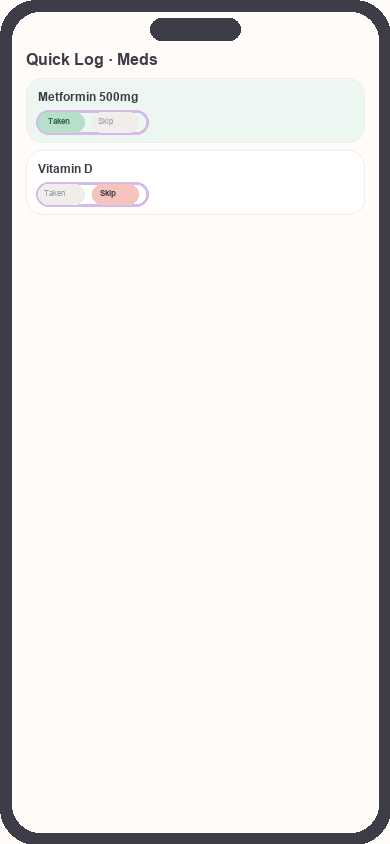
Medication quick log routine
Focus: Focus on taken/skipped toggles for each med
- When your prescriber changes a dose, update the medication profile the same day so future logs match the new order.
Adherence tips
- Pair Morning quick routine with breakfast or your first coffee.
- Use phone reminders outside Kinsula if you need an extra nudge — the app records what you confirm inside quick routines.
- Bring adherence summaries to follow-up visits; they are easier to discuss than memory alone.
Related guides
Need more help?
Email support@suncture.io or return to the guides index.
Related guides
More step-by-step help for the Kinsula patient app.
Complete daily notes and quick routines
Use daily notes and Quick Log routines (Morning, before meal, after meal, Night) to capture glucose, meds, insulin, and reflections in fewer taps.
Connect your care team with Health Auth
Use Health Auth to share structured Care Review data with your hospital care team only when you explicitly consent — common in Evercare-linked pilots.
Create your Kinsula account
Sign up for a secure Kinsula cloud account so your glucose logs, medications, and Recovery Island progress sync across devices.
Log meals and track how food affects glucose
Record meals and snacks with timing so you can compare pre- and post-meal glucose and learn patterns during Recovery Island.
Log your first glucose reading
Record a blood glucose value with context (fasting, before meal, after meal) using Quick Log or a single reading entry on the Log tab.