Message your care team securely
Send and read care team messages in the Kinsula app after your account is linked, without sharing passwords or personal email threads.
By Isaac Williams
When your hospital participates in Kinsula and you have completed Health Auth, you may get an in-app Messages or Care inbox for questions that are not emergencies.
Before you message
- Emergencies: Call your local emergency number or go to the nearest emergency department — do not wait for an in-app reply.
- Routine questions: Messages work well for logging clarifications, appointment follow-ups, and non-urgent glucose pattern questions.
Steps
- Open Messages (or Care team chat) from the home tab or profile menu.
- If you see an empty inbox, confirm Health Auth shows Connected under Profile → Integrations.
- Tap New message or reply inside an existing thread from your care coordinator.
- Write a clear subject or first line (for example “Fasting readings this week” or “Question about metformin timing”).
- Avoid sending photos of unrelated personal information; stick to recovery-related context your team requested.
- Send the message. Delivery indicators vary by pilot — you may see sent, delivered, or read states when supported.
- Enable push notifications for Kinsula if you want alerts when a clinician responds.
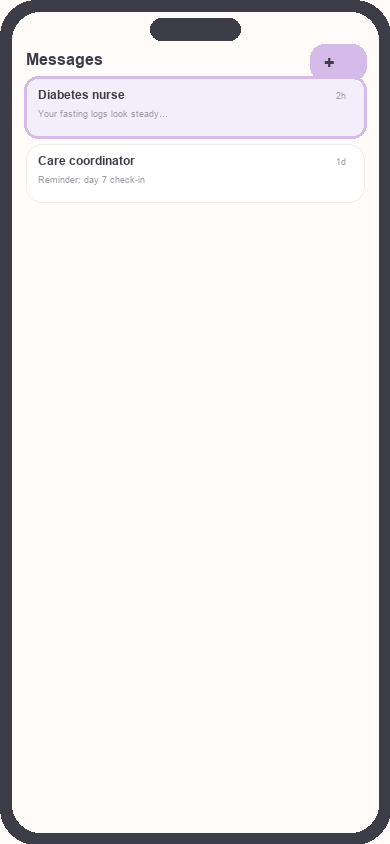
Care messages inbox
Focus: Highlight thread list and compose button
- Review replies in the same thread. Tap links only if they point to trusted hospital or Kinsula domains.
Good practices
- Log glucose and meds before asking “is this pattern okay?” so your team sees structured data in Care Review.
- Note the date range you are asking about in the message body.
- If you revoke Health Auth, new messages may be disabled even if old threads remain visible read-only.
Need more help?
Email support@suncture.io or return to the guides index.
Related guides
More step-by-step help for the Kinsula patient app.
Complete daily notes and quick routines
Use daily notes and Quick Log routines (Morning, before meal, after meal, Night) to capture glucose, meds, insulin, and reflections in fewer taps.
Connect your care team with Health Auth
Use Health Auth to share structured Care Review data with your hospital care team only when you explicitly consent — common in Evercare-linked pilots.
Create your Kinsula account
Sign up for a secure Kinsula cloud account so your glucose logs, medications, and Recovery Island progress sync across devices.
Log meals and track how food affects glucose
Record meals and snacks with timing so you can compare pre- and post-meal glucose and learn patterns during Recovery Island.
Log medications and build adherence
Add discharge medications, log doses with Quick Log routines, and review adherence so you and your care team see a clear med history.